
Leaderboards
Successful Room Sessions now rank in the dashboard and on a lobby display you configure yourself. Choose the Rooms it rotates through, the period it covers, and how many teams appear, then publish when the draft looks right.
Rankings with rules you can explain
Leaderboards ranks successful Room Sessions for a Room and a period — today, this week, this month, or all time. Saved time remaining sets the order. In Rooms that collect reported Clues, fewer Clues breaks a tie; in Rooms that do not, equal times stay tied and no Clues column appears. Failed Room Sessions are never ranked.
Individual entries stay under your control. Use the row edit action to correct a public team name, or select Exclude from public leaderboards to keep a Room Session in Room Statistics without showing it in the lobby. Show excluded lists what you have taken out, so a removal is never silent.
Build the lobby display as a draft
Display settings is a draft workspace. Set the title, subtitle, and logo; add Rooms and drag them into the order they should appear; choose how many teams to show and the ranking period; then pick the default background, any Room-specific exceptions, and the fallback colour used when there is no image.
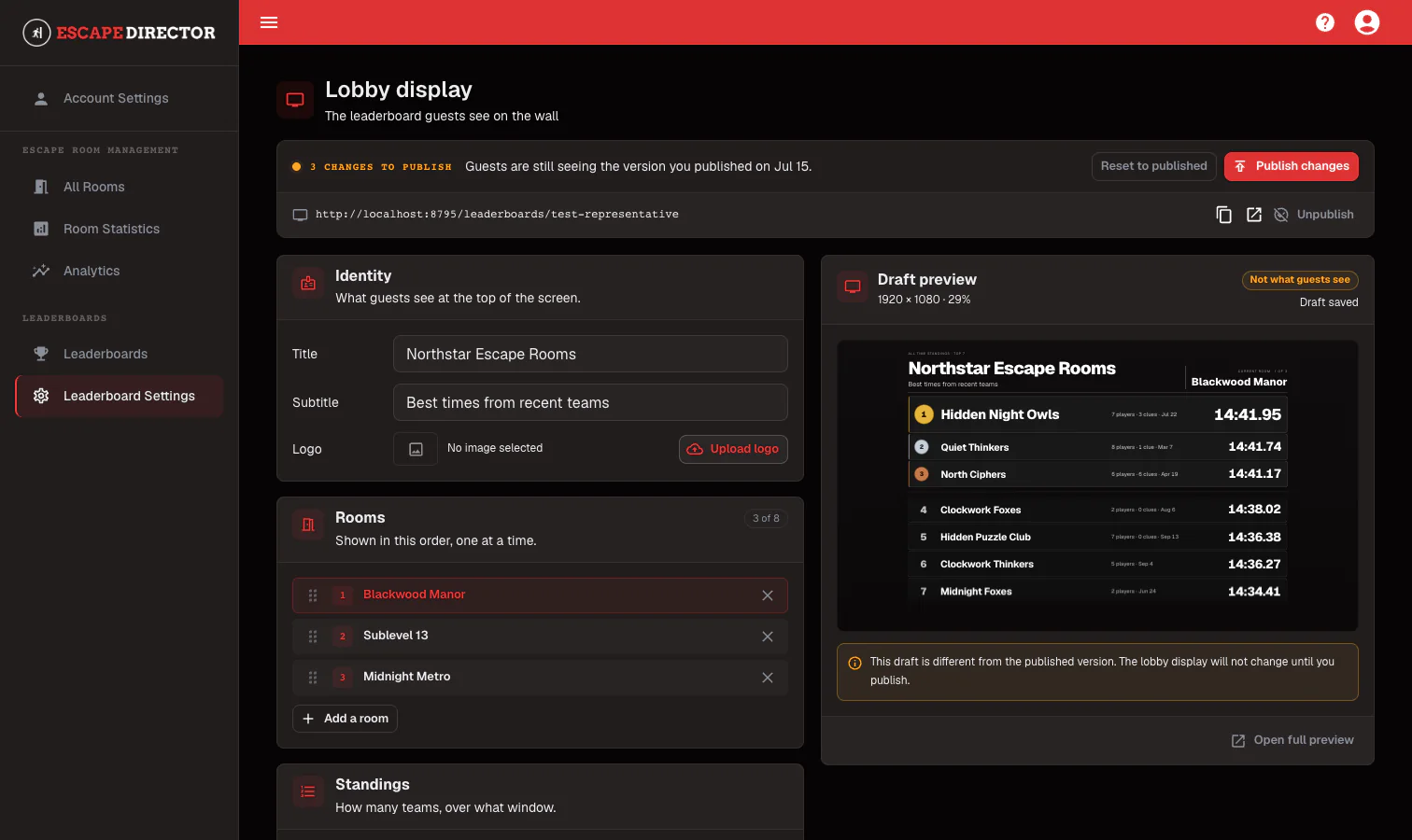
Nothing you change reaches the lobby screen until you publish it. The draft preview sits beside the settings while the public display keeps showing the last published version. Reset to published discards a draft you have decided against, and View live opens the same link the lobby screen uses so you can judge it at display size.
It keeps itself current
Results refresh as games finish, so the next group walks past a time that was set an hour ago rather than one from last week — and nobody has to open a dashboard between sessions to make that happen.
Keep going in the Product Guide
Find step-by-step instructions and more detail in the Product Guide.
Also in this update
Improvements
4
Improvements
4Offline status now names the actual condition wherever a Room appears — Offline update needed, Offline access expired, Offline files need repair — and a banner explains that offline-ready Rooms and game controls keep working while online-only actions are unavailable.
Account actions that need the server, such as opening Account Settings or logging out, say to reconnect instead of failing when you select them offline.
An application update can no longer interrupt a live game. The update prompt reports that a game is active and Update now stays disabled until the Room Session ends.
The public demo on the marketing site runs on representative Rooms and media rather than real customer content.
Fixes
1
Fixes
1Complete Room stayed unavailable for the rest of a game in Rooms where a video brief starts the timer automatically.