
Analytics
Completed Room Sessions now feed a dashboard workspace. Start from a template built around one question, arrange the cards you actually review, and read every number beside the sample and coverage that produced it.
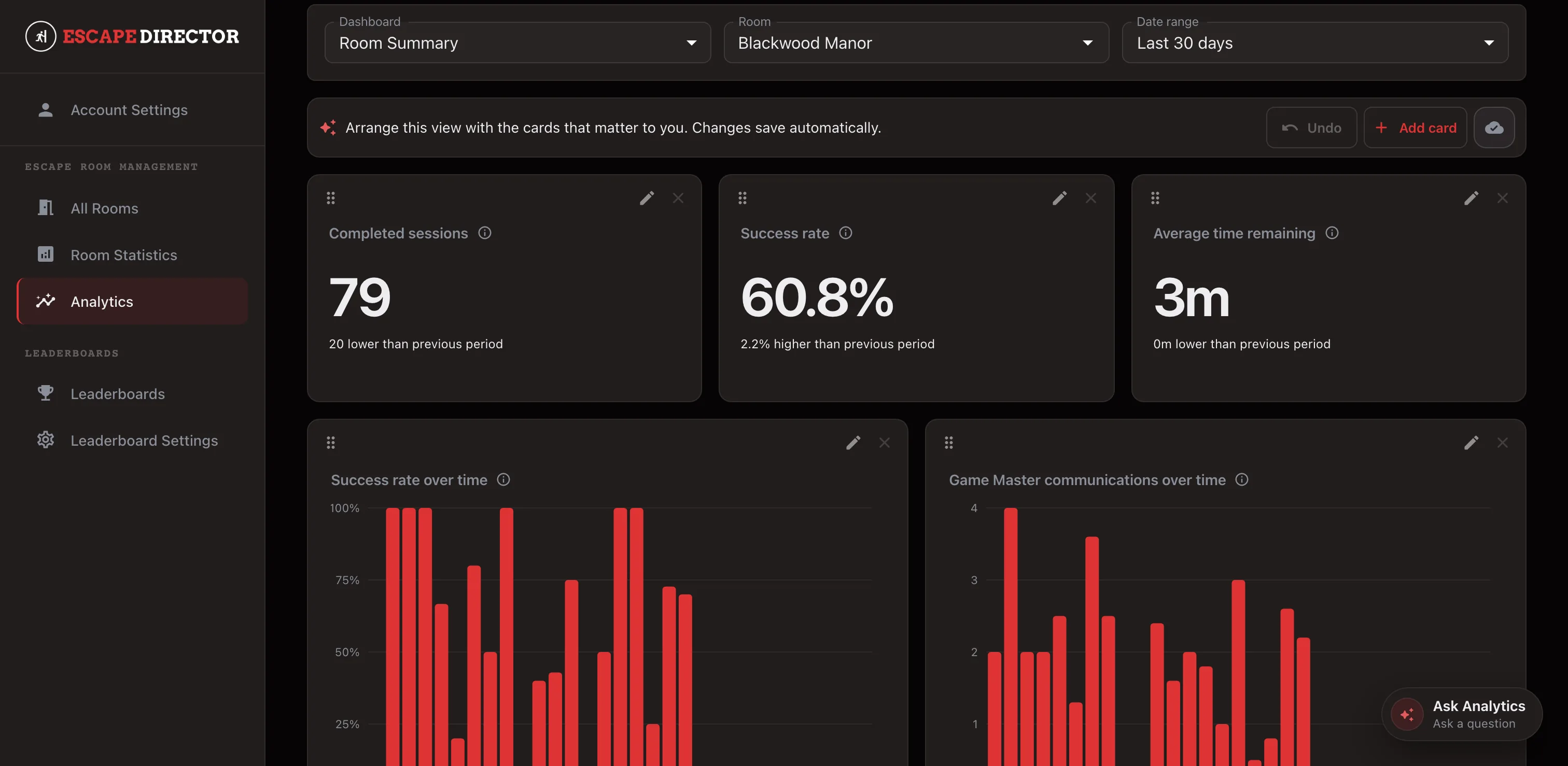
Start from the dashboard that matches the question
Analytics opens on Dashboards. Room Summary covers one Room: completed Room Sessions, Success Rate, and Average Time Remaining, with success rate and Game Master communications by day. Game Master Summary narrows the same measures to one person inside that Room. Puzzle Performance shows completion rate, typical completion time, and average Clues before completion for each Puzzle. Player Experience splits results by whether a group was all first-time, mixed, or all experienced players.
Choose the Room and the Analysis Period — the last 30 days by default, or 90 days, six months, a year, all time, or a custom range. The period applies to every card on that dashboard, and each trend picks a grouping that stays readable over the length you chose.
Puzzle breakdowns follow the Room's configured Puzzle order rather than sorting best to worst, so progression and drop-off are easy to scan. Reordering a Puzzle changes only that presentation; it never rewrites past results.
Arrange the cards around your review
Add card offers the supported metrics and the presentations each one allows. Move and resize cards so the questions your team asks every week sit where you look first. Layout changes save on their own — wait for Saved before you leave the page.
Analytics accepts defined metrics and their supported parameters, not free-form formulas, so a card means the same thing on every dashboard, in every comparison, and in every export.
Read the evidence, not just the number
Every result carries its own explanation: the metric's meaning, which Room Sessions were eligible, the named Room scope, the period and resolved time zone, the sample size, and coverage. Limited data means the answer is available but its sample or coverage is thin — not that zero was observed.
When you need a governed number outside the app, export a single card as CSV. The export re-runs that card's exact query and returns the aggregate only, never raw Room Sessions.
Compare deliberately
Compare is a separate workspace for setting two to five Rooms, or the Game Masters working inside one Room, beside each other. Each side keeps its own sample size and coverage, and nothing is pooled into a single overall score.
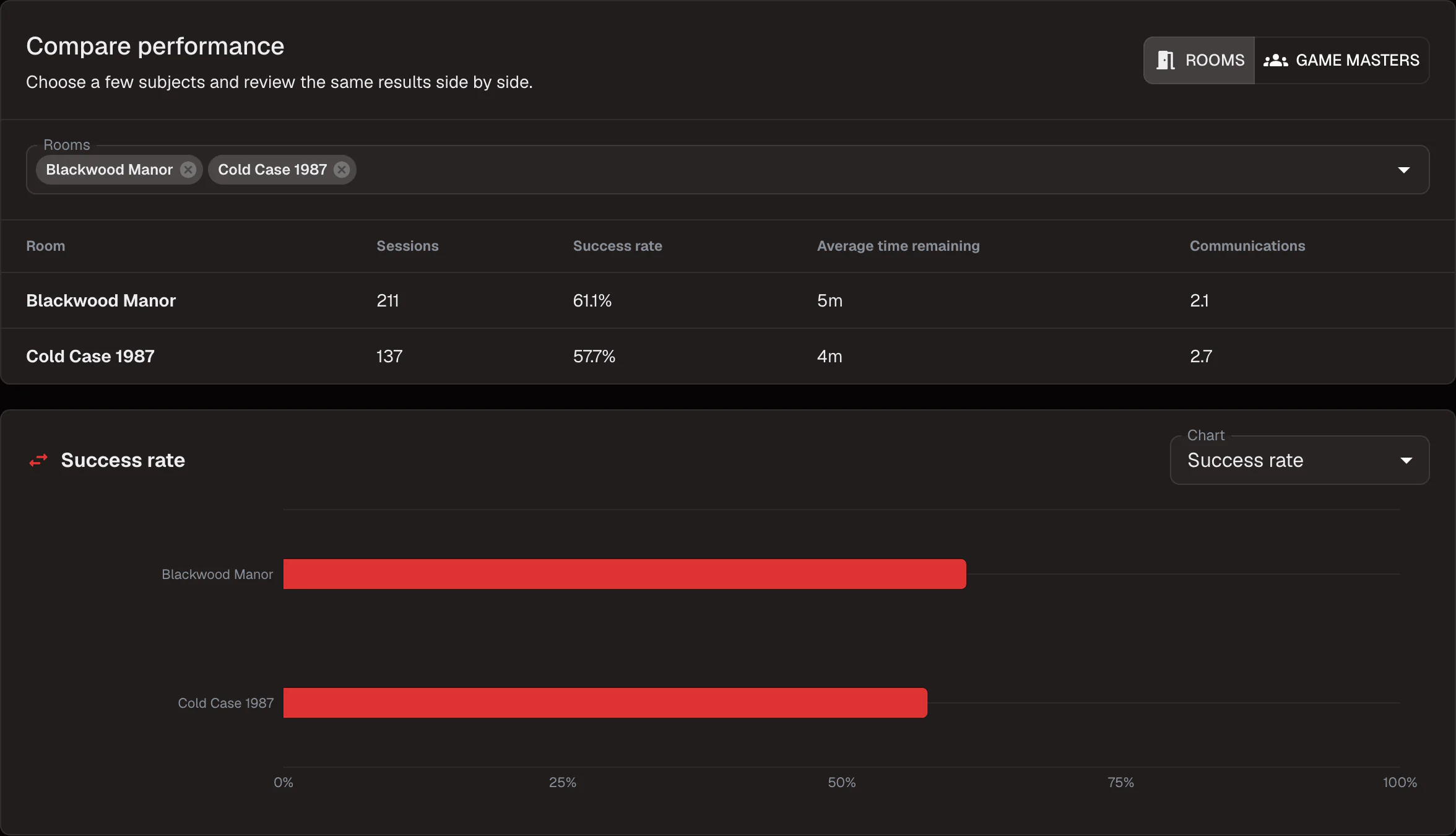
Differences are presented as what was observed, not as proof that one Room or one person caused them. Two Rooms with different lengths and difficulty will differ for reasons no metric here is claiming to explain — which is exactly why the sample and coverage stay next to the value.
Keep going in the Product Guide
Find step-by-step instructions and more detail in the Product Guide.
Also in this update
Improvements
11
Improvements
11Puzzles and Clues can be added, edited, reordered, and deleted from the Room Dashboard while a game is running. Content edits apply to the next game, and the dialog says so — the session in progress keeps the Puzzles it started with, along with its completions and Session Log.
Turning off “Counts as solved” makes a Puzzle row a Clue Section: a way to group related Clues without adding to the completed-Puzzle count or to Puzzle analytics. Whether a Puzzle counts as solved is fixed when a game is admitted, so changing it mid-shift cannot rewrite a running session.
Game Master profiles are managed from the Game Master selector on any Room Dashboard. Add one profile per person, rename it when their staff-facing name changes, and archive people who should no longer be selectable for new sessions while their past sessions stay attributed.
A game can start before a Game Master is chosen. Select one from the Dashboard header at any point during the game and it carries into the end-of-session dialog, where it can still be corrected before you save.
Renaming a Game Master profile updates the name shown in Room Statistics and Leaderboards immediately instead of after a reload.
A saved Room Session can be corrected from Room Statistics — team name, Game Master, reported Clues, player counts, and notes. The previous value, the corrected value, who changed it, and when are all retained, and the original event history is never rewritten.
Each Room now decides whether it collects Reported Clues Used. When it is off, the end-of-session field is not shown or required, and the public leaderboard drops its Clues column and leaves equal times tied. Existing Rooms keep collecting it and rank exactly as before.
The public leaderboard paces itself and no longer has a rotation-interval setting. Standings that fit hold on screen, a longer list scrolls at a steady readable speed and advances when it reaches the end, a display set to reduce motion pages through the list instead, and touching the screen pauses the movement for a few seconds before it resumes where you left it.
Analytics charts separate an observed zero from data that is simply unavailable, use one tooltip structure across values and empty rows, and replace a chart with no available values with an explicit coverage note rather than an empty plot.
Long Clue text and custom messages wrap in the Session Log instead of being cut off, and Puzzle completion entries read more clearly at a glance during a game.
Reset Room hands straight to the next group. The Dashboard reuses the Room it has already verified instead of re-reading it from the server, and a Room Station keeps media that has not changed rather than downloading it again after a Room edit.
Fixes
4
Fixes
4A Clue queued in the message box was discarded as soon as you selected a different Puzzle.
Editing a Room while a game was running could disturb the player display. Live View now holds the Room revision the game was admitted with and releases it only when that game ends.
Puzzle completion progress could be lost during a game when the Room's Puzzles were edited.
Signing in could show the application before the session was confirmed, leaving the first screen looking signed out. Sign-in now waits for the confirmed session and reports a clear error when one cannot be established.